TABS
- Export container “Not Ready” on TABS
- Gatepass Errors in Truck Manifesting
- Holds in booking an import reefer container in TABS
- How to edit the details of your submitted truck manifest
- How to resolve errors during Truck Manifest creation in TABS
- How to submit requirements for “Expanded Withholding Tax (EWT)” option in TABS
- How to submit requirements for “ZERO VAT” option in TABS
- How to top up your TABS points
- Import Container "Not Ready" in TABS
- Truck Manifesting User Guides
How to use TBA slot in Truck Manifesting
- To book a TBA slot, click the container number under the PICK UP section and choose from the available slots. After this, TBA will then be available under the DROP OFF section.

2. Click the TBA under the DROP OFF section and choose a matching zone for the PICK UP container under the TBA tab. Then, click on CONFIRM.
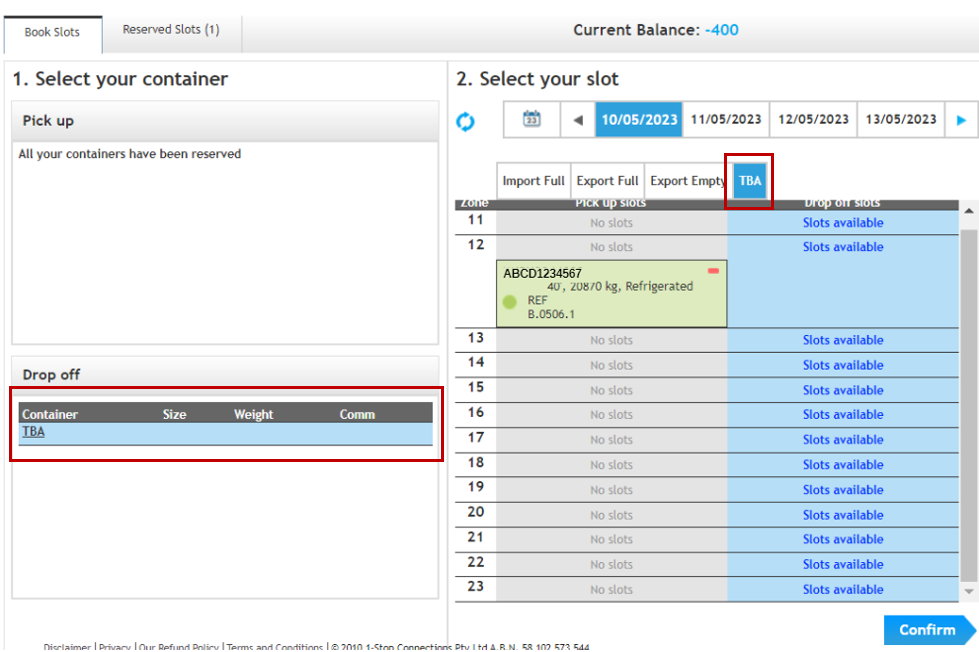
3. If the transaction is 2 x Drop off containers and 1 x Pick up container, please watch the video tutorial below:
4. If the transaction is 1 x Drop off container and 2 x Pick up containers, please watch the video tutorial below:
5. If the transaction is 2 x Drop off containers and 2 x Pick up containers, please watch the video tutorial below:
6. If you wish to book an export container using the TBA slot if an import container has already been booked, please watch the video tutorial below:
NOTES:
· Please update your booking list once the container has preadvise.
· TBA slots are always available, so take advantage of this for your terminal transactions.
· There is no corresponding fee if a TBA slot is not utilized or is cancelled.
· TBA slots are free. You may use up to two (2) slots per pick up container.
REFERENCE:
1. MICT e-Gate: TBA Slots - MICT e-GATE: TBA SLOTS
ABBREVIATION:
TBA – To Be Advised